デスクトップモードで探索する
Desktop users are restricted to using their keyboard and mouse to do things in Overte. On this page, you can find all of the shortcuts so that you can enjoy your experience in Overte to the fullest.
注釈
The shortcuts below are for Windows and Linux computers. If you're running on a Mac, use the same commands, substituting the Command key for the Ctrl key.
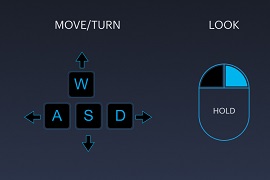
Movement Controls
Action |
Key |
|---|---|
Walk Forward |
|
Walk Backward |
|
Run |
Hold |
Side Step to the Left |
|
Side Step to the Right |
|
Turn Left |
|
Turn Right |
|
Jump |
|
Fly |
Hold |
Fly Down |
|
In-World Controls
Action |
Key |
|---|---|
Handshake |
|
Toggle Privacy Shield |
|
Open Tablet |
|
Select Item |
Left Click |
Grab Item |
Left Click |
Inspect Item |
|
Open Web-Browser |
|
Toggle 'Away from Keyboard' |
|
Toggle 'Mute Mic' |
|
Toggle 'Show Statistics' |
|
Screenshot |
|
Push to Talk |
|
Camera Controls
Action |
Key |
|---|---|
First Person View |
|
Third Person View |
|
Selfie View |
|
Pan In/Out |
With mouse, use mouse wheel. On trackpad, drag two fingers up or down. |
Toggle Mouselook |
Must enable mouse look in controller settings
and then use |
Avatar Sizing Controls
Action |
Key |
|---|---|
Decrease Avatar Size |
|
Increase Avatar Size |
|
Reset Avatar Size |
|
Create and Edit Mode
These controls work when the Create app is open.
Action |
Key |
|---|---|
Undo |
|
Redo |
|
Delete Entity |
|
Focus on Selected Entity |
|
Toggle Grid |
|
Toggle Snap to Grid |
|
Align Grid to Selected Entities |
|
Align Grid to Avatar |
|
Duplicate Entity |
|
Parent Entity |
|
Unparent Entity |
|
Copy Entity |
|
Paste Entity |
|
Toggle Local/World Transform |
|
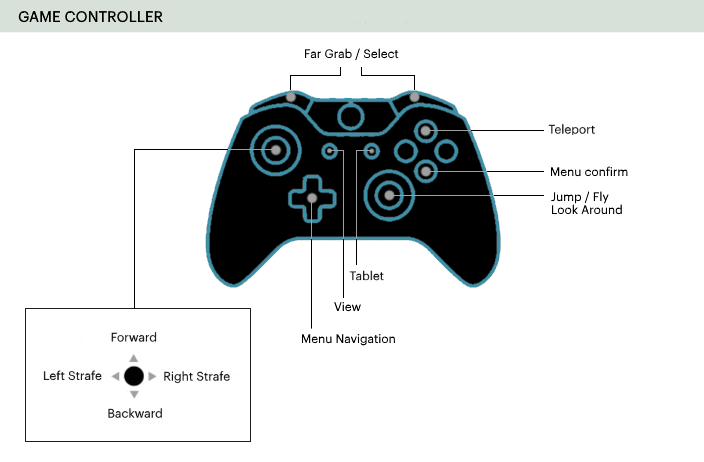
Gamepad
キーボードの代わりにゲームパッドを使って、デスクトップモードでOverte を体験することができます。