Change Your Avatar
When you first use Overte, you will be wearing the default avatar, Woody. Your avatar will represent you in the digital realm. With it you dictate how other people see you through how your avatar looks and moves. You can have full control over your persona as you speak to other users in-world.
On This Page:
Use Your Own Custom Avatar
You can use an avatar that you created. Learn more about how you can create your avatar here.
Note
All avatars must be hosted at a publicly accessible web address, so everyone you meet can see it. They can be hosted on your own HTTP(s) server, on your website or at any web hosting service. Just make sure you can provide a direct link to the file itself; a web page with a download link will not work.
Once you have your avatar, you can upload it. Your avatar may include an .fst, .glb/fbx/glTF, images, animation .json, and any number of other files which should all be uploaded to a publicly accessible location so all users of Overte can see it.
In Overte Interface, pull up your tablet or HUD and click on Avatar.
In the Avatar window, click the link icon next to your current avatar.
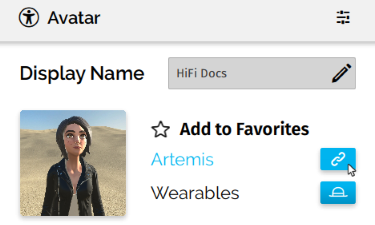
Enter the .fst file's URL and click 'Confirm'.
If you want to access this avatar later without loading the .fst file information again, you can click on 'Add to Favorites' to save the current avatar information.
See Also